Menu Commands
Menu commands start central actions in Rillsoft Project. Availability depends on the active view, operating model, and installed modules.
File
Typical commands:
create, open, and save projects
open a project portfolio or summary project
create or select the resource pool, import it into Integration Server, or export it from there (see Create and Select a Resource Pool with Rillsoft Integration Server)
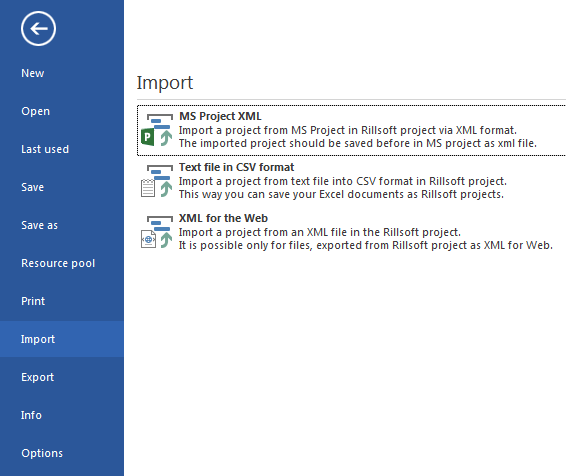
import from MS Project XML, CSV, XML for web, or GAEB
export to MS Project XML, XML, Excel, or iCalendar
print and print preview
Start

Typical commands:
create activities, subprojects, and milestones
link activities
open project, activity, and resource properties
show information about late activities, overallocated resources, failed resources, and unassigned resources
control outline, grouping, filter, and search

Project

Typical commands:
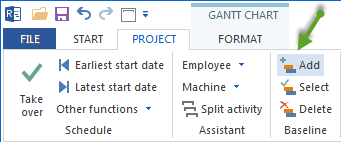
add, select, or manage baselines
set cutoff date
switch project resources to the shared resource pool
start assistants, for example employee assignment
use Integration Server functions and cross-project links
Resources (Groups in the Start Ribbon)
Resource management is organized in the start ribbon:
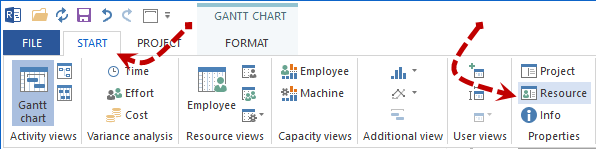
Open the resource pool via Start > Properties > Resources
Maintain roles and professional qualifications
Manage employees, teams, materials, machine types, and machinery
Check calendars, working hours, and days off
Views
View switching is available from the Start ribbon:
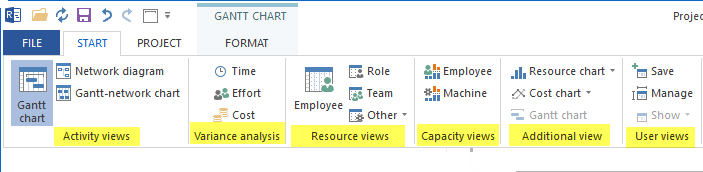
activity views
variance analysis
resource views
capacity views
additional views
user views
filter and search
view-specific Format tab for timescale, columns, and Excel output
Add-Ons

Depending on installation and operating model, add-ons can include iCalendar, DMS, time recording, vacation planning, or other Integration Server modules.