Employee Time Entry
Use this page to display information about completed working hours by task and employee.
Prerequisite: You or assigned employees can enter time entries only in the Rillsoft Integration Server interface. In Rillsoft Project, time entry data can only be read after it has been entered in Rillsoft Integration Server.
Time Entry in Task Properties
Open the properties window of a task by double-clicking the task in the Gantt chart or task list.
Open the Timesheet tab.
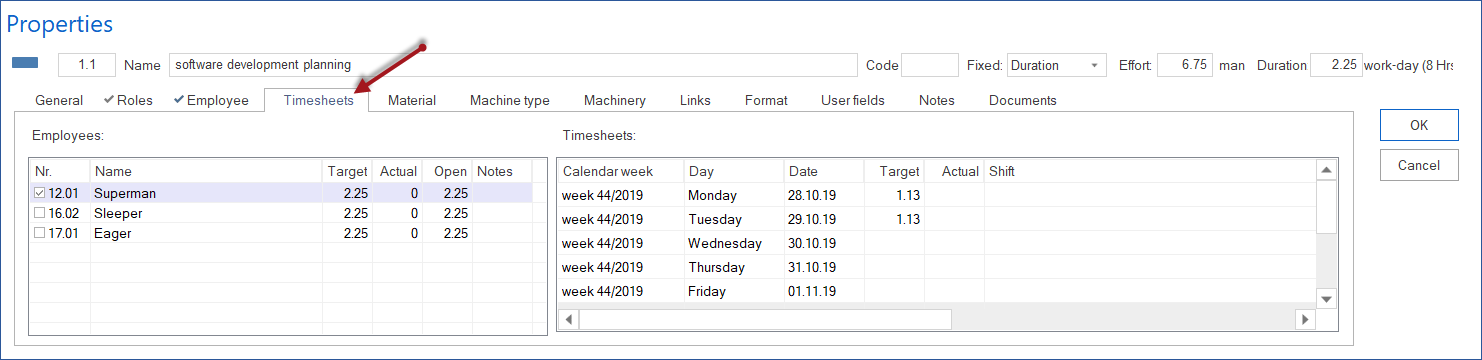
Employees
All employees assigned to the task are listed here.
Column |
Meaning |
|---|---|
Name |
Name of the assigned employee. |
Effort |
Planned effort for this employee in the task. |
Close |
Effort already completed by the employee for the task. |
Open |
Remaining open effort for this employee in the task. |
Notes |
Optional notes. |
Timesheet
For an employee selected on the left, you can see how the employee worked on the task day by day.
Column |
Meaning |
|---|---|
Week |
Calendar week in which the employee worked on the task. |
Weekday |
Day of the week on which the employee worked on the task. |
Date |
Date. |
Effort |
Planned effort for this employee on the day and for the task. |
Close |
Effort already completed by the employee on that day. |
Shift |
Time of day. |
Time Entry in Employee Properties
Open the properties window of an employee by double-clicking the employee in a resource view.
Open the Timesheet tab.
Activities
All tasks assigned to the employee are listed here.
Column |
Meaning |
|---|---|
Name |
Name of the assigned task. |
Effort |
Planned effort for this employee in the task. |
Close |
Effort already completed by the employee for the task. |
Open |
Remaining open effort for this employee in the task. |
Notes |
Optional notes. |
Whether effort is displayed in person-hours or person-days depends on project settings.
Timesheet
For a task selected on the left, you can see how the employee worked on the task day by day.
Column |
Meaning |
|---|---|
Week |
Calendar week in which the employee worked on the task. |
Weekday |
Day of the week on which the employee worked on the task. |
Date |
Date. |
Effort |
Planned effort for this employee on the day and for the task. |
Close |
Effort already completed by the employee on that day. |
Shift |
Time of day. |
Relation to Target/Actual Comparison
Employee-level time entry is a basis for project-wide target/actual comparison. It complements task progress with actual resource consumption.
After time entry, check:
whether actual effort of individual employees is within the plan
whether individual employees worked significantly more or less than planned
whether deviations are caused by planning errors or project changes