logo
Rillsoft Project 9 documentation
Function Reference
Initializing search
      • First Steps with Rillsoft Project
        • Choose an Operating Model
      • Choose an Operating Model
      • Tutorials
        • Create a First Schedule in 10 Minutes
        • Assign Resources in 10 Minutes
        • Identify Resource Overloads in 10 Minutes
        • Perform Capacity Balancing in 10 Minutes
        • Prepare a Target/Actual Comparison in 10 Minutes
        • Open a Project Portfolio in 10 Minutes
      • Orientation for New Users
      • Project Planning
        • Build a Project Structure
        • Plan Tasks
        • Use Task and Subproject Tables
        • Link Tasks
        • Manage Tasks During Planning
        • Analyze the Critical Path
        • Stabilize the Schedule Before Control Starts
        • Reload a Project
        • Manage Subprojects
      • Resources and Capacities
        • Plan Resource Demand by Qualifications
        • Derive Resource Supply From the Resource Pool
        • Maintain Working Times and Non-Working Days
        • Perform Capacity Balancing
        • Capacity View Variants
        • Resource View Variants
        • Structure Resource Views
        • Synchronize Resources
      • Resource Assignment
        • Assign Employees Directly
        • Assign Employees After Capacity Balancing
        • Check Employee Assignments
        • Choose Direct or Capacity-Based Assignment
        • Assign Resources Automatically
        • Assign Additional Resources
        • Employee Time Entry
      • Target/Actual Comparison and Project Control
        • Save Baseline and Enter Progress
        • Perform Target/Actual Comparison
        • Target/Actual Comparison Views
        • Evaluate Plan Deviations
        • Prepare a Status Report
        • Control Project Financing
        • Project Information and Status Panel
        • Prepare Project Closure
      • Project Portfolio and Multiproject Management
        • Build a Project Portfolio
        • Control Multiproject Planning
        • Portfolio Analysis
        • Manage a Summary Project
      • Troubleshooting and Decision Support
        • Why Does My Project Date Shift?
        • Why Is a Task Not Movable?
        • Why Does a Resource Show Overload?
        • Why Do Target and Actual Values Not Match?
        • Why Does a Project Not Appear in the Portfolio?
        • Why Are Unassigned Resources Shown?
        • Why Are There Partially Assigned Resources?
        • Why Are Tasks Not Rescheduled After Plan Changes?
        • Decision Guides
          • Direct Resource Assignment or Role-Based Planning?
          • Individual Project, Summary Project, or Project Portfolio?
          • Baseline or Dynamic Baseline?
          • Schedule First or Resource Planning First?
          • Manual Correction or Capacity Balancing?
        • Checklists
          • Checklist: Check Project Before Planning Approval
          • Checklist: Validate Resource Planning
          • Checklist: Prepare Target/Actual Comparison
          • Checklist: Prepare Portfolio Review
          • Checklist: Check Data Before Import or Export
      • Role-Based Entry Points
        • Project Manager
        • Resource Manager
        • PMO
        • Executive Management
        • IT and Administration
        • Entry Point for Construction Planners
        • Entry Point for IT Project Managers
      • Expert Knowledge
        • Integration Server
        • Setting Up Integration Server
        • Multiproject Planning
        • Portfolio Analysis
        • XML
        • DMS
        • Templates
        • Optimization
        • Advanced Import and Export
        • Best Practices
        • Practical Examples
      • Reference System
        • Function Reference
          • Menu Commands
          • Dialogs
          • Program Settings (File > Options)
          • Options
          • Context Menus
          • Views
          • Customize Views: Filters, Format, Custom Views
          • Portfolio View
          • Print And Output
        • Function Reference
          • Menu Commands
          • Dialogs
          • Program Settings (File > Options)
          • Options
          • Context Menus
          • Views
          • Customize Views: Filters, Format, Custom Views
          • Portfolio View
          • Print And Output
        • Data and Object Model
          • Project
          • Subproject
          • Activity
          • Link
          • Resource
          • Resource Pool
          • Manage Resource Pool
          • Baseline
          • Project Portfolio
        • Interfaces and Expert Functions
          • Import
          • Export
          • XML
          • DMS
          • Templates
          • Optimization
          • Integration Server
      • Search Page
      • Imprint

    Function ReferenceΒΆ

    The function reference describes the most important operating areas of Rillsoft Project and related functions from Rillsoft Integration Server.

    Function reference menu
    • Menu Commands
    • Dialogs
    • Program Settings (File > Options)
    • Options
    • Context Menus
    • Views
    • Customize Views: Filters, Format, Custom Views
    • Portfolio View
    • Print And Output

    Use this section as a quick lookup for menus, dialogs, views, display options, and output functions.
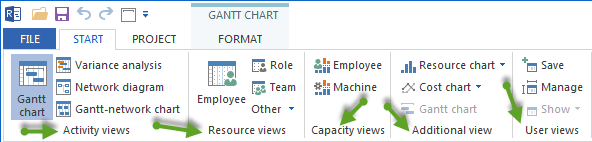
    Select views and functions
    Previous
    Reference System
    Next
    Menu Commands
    © Copyright 2026, Rillsoft GmbH.
    Created using Sphinx 9.1.0. and Sphinx-Immaterial