Working in Networks
To avoid conflicts between resources, all users in the network should access the same resource pool. After starting, Rillsoft Project connects to a resource pool. Its location is shown in the left corner of the status bar.

The file-based solution and the database-based solution (Rillsoft Project with the interface to Rillsoft Integration Server) differ here.
File-Based Solution
The resource pool is an XML file stored in the application folder.
For network work or a floating license, this file must be stored on a
network path, for example \\Server_Name\Rillsoft Project, or start on a
mapped drive, for example R:\Rillsoft Project. A local path such as
C:\Rillsoft Project is not permitted for a floating license.
Switching from a local folder to a network folder (relevant only for a floating license)
If your resource pool file points to a local path, proceed as follows:
Use Windows Explorer to copy the local Rillsoft folder that contains your resource pool file to the clipboard.
Paste it into a network folder on the server.
Choose File > Resource pool > File > Select.
In the Open dialog, select the pasted Rillsoft folder on the server.
Select the resource pool file from the Rillsoft folder on the server.
Check in the left corner of the status bar that the resource pool file uses the correct path.
Rillsoft Project separates its file storage: program files are stored in the program folder, and all user data is stored in the user folder (data folder). During installation, full access rights for all users are set on the user folder. Users do not need write access to the program folder.
Database-Based Solution (Rillsoft Integration Server)
With the interface to Rillsoft Integration Server, the resource pool is stored in a central database.
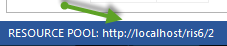
This removes the need to manage network paths for the resource pool file. Multi-user operation, permissions, and central data storage are handled by the server.