Optimization
Optimisation in Rillsoft Project helps improve schedules and resource utilisation. It is not an automatic management decision. The result must be checked against project logic, fixed dates, critical path, resource bottlenecks, and portfolio priorities.
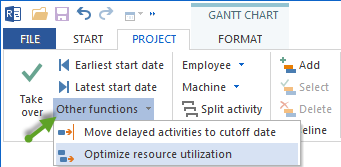
What Optimisation Can Do
Optimisation can support:
better resource utilisation
schedules that work towards a predefined finish date
movement of activities within available free float
conflict reduction in a project plan
analysis of whether planning constraints are realistic
What Optimisation Cannot Replace
Optimisation does not replace:
a clean project structure
correct links and link types
realistic activity durations
maintained resource calendars
current resource supply
management decisions about priorities
review of cross-project effects
Prerequisites
Before optimising, check:
activities and subprojects are structured logically
links represent real dependencies
fixed dates are deliberately set
resource demand is planned consistently
employee calendars and non-working days are current
the baseline situation is understood
Fixed Dates And Constraints
Use fixed dates only when they represent real constraints, for example a customer milestone, delivery date, or external approval. Fixed dates affect how optimisation can move activities.
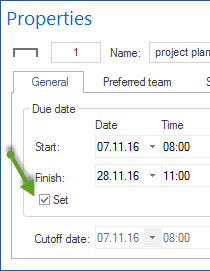
If too many activities are fixed, optimisation cannot improve the plan meaningfully. If too few constraints are fixed, the result may be technically valid but organisationally unrealistic.
Free Float
Free float helps you understand how far activities and subprojects can move before they reach the next fixed frame in the schedule; the calculation runs no earlier than the cutoff date. On subproject rows, the line shows the envelope of the contained activities, not a buffer of its own.

Use free float to evaluate whether an optimisation result still leaves enough planning flexibility.
Optimisation In A Single Project
In a single project, optimisation usually aims for a realistic schedule or better resource utilisation.
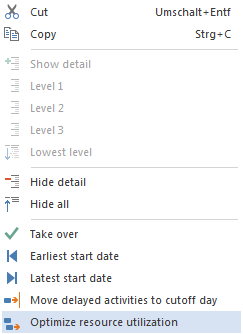
After optimisation, check:
Which activities were moved?
Did the critical path change?
Are new resource bottlenecks created?
Were fixed activities respected?
Are business dependencies still plausible?
Optimisation In Portfolio Context
Local optimisation may improve one project while making another project worse. In a multi-project environment, review:
total employee workload
scarce professional qualifications
project priorities
cross-project links
effect on bottleneck projects
Typical Mistakes
Optimisation is applied to a poorly structured plan.
The result is accepted without checking the critical path.
Resources are optimised in a single project although portfolio conflicts exist.
Fixed dates and business milestones are not reviewed.
Optimisation is understood as an automatic decision.