Stabilize the Schedule
A schedule is reliable only after it has been checked and stabilized deliberately. This article describes how to check a completed plan systematically, clean up mistakes, and release it for resource planning.
When to Stabilize
Stabilize the schedule before you:
assign resources and capacities
align the plan with the customer
save a baseline
transfer the plan to Rillsoft Integration Server
An unstable plan (open cycles, manual dates everywhere, missing dependencies) makes resource planning and capacity balancing unreliable.
Check List
Go through the plan systematically:
Structure:
[ ] All subprojects professionally separated and meaningfully named?
[ ] No subprojects that contain only a single task?
[ ] All tasks with result-oriented names?
[ ] Task durations between 1 and 20 working days (guideline)?
Dependencies:
[ ] All tasks linked with at least one predecessor or successor (except start and finish milestones)?
[ ] No cycles (Rillsoft Project marks them as errors)?
[ ] No unnecessary intervals that only serve date cosmetics?
[ ] Dependency type professionally correct (FS is the standard case)?
Dates and durations:
[ ] As few manually set dates as possible — only where professionally required?
[ ] No unrealistic durations (0 days for normal tasks, 200 days for detail tasks)?
[ ] Start and finish milestones exist?
Critical path:
[ ] The critical path ends at the project completion milestone?
[ ] The critical path is professionally plausible?
[ ] Free float for non-critical tasks exists and is understandable?
Consistency:
[ ] No consistency warnings in the information panel?
[ ] No orphaned milestones without dependencies?

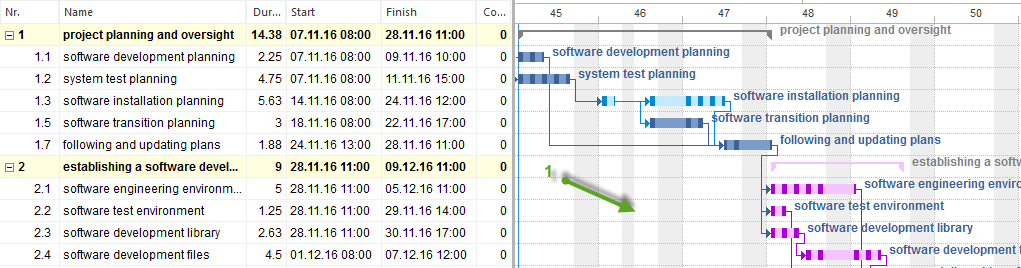

Common Mistakes and Their Solutions
Mistake |
Effect |
Solution |
|---|---|---|
Tasks without dependencies |
Dates are not updated when other tasks move |
Identify predecessors and successors and connect them |
Too many manually set dates |
The plan does not react to changes; manual rework after every move |
Remove manual dates; fix only the project start date |
Cyclic dependency |
The plan cannot be calculated; Rillsoft Project shows an error |
Locate the cycle in the network diagram and remove one dependency |
Critical path does not end at completion |
The finish date calculation is wrong |
Link all final tasks to the completion milestone |
Tasks with duration 0 (except milestones) |
Planning intent unclear; can distort calculations |
Set an estimated duration or recreate the task as a milestone |
Intervals as buffer replacement |
Buffer reserves become invisible; decisions rest on a wrong basis |
Use intervals for real waiting times; let buffers arise from structure |
Optimize the Schedule
If the calculated finish date does not match the target date, proceed in this order — not the other way around:
Check dependencies — are there unnecessary sequential dependencies that can be parallelized?
Check durations — are estimates conservative? Are there critical-path tasks that can realistically be shorter?
Check resources — can more capacity be concentrated on critical tasks?
Discuss the scope — if the date cannot be reached, this belongs in project communication, not in plan cosmetics.
What you should not do:
Manually “fit” individual dates without knowing the cause.
Shorten intervals to create buffer that does not exist.
Save the baseline before the plan has been checked.
Save a Baseline
A baseline freezes the current state and later enables target/actual comparison. Save it only when:
the project structure is final
all important tasks are linked
the schedule is aligned with the customer
resources are assigned (or resource planning should start from this basis)
Saved too early: The baseline contains unfinished estimates — the target/actual comparison is wrong from the start.
Saved too late: The project is already running; no unchanged starting point exists any more.
Save a baseline:
Choose Project > Baseline > Add.
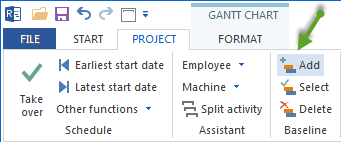
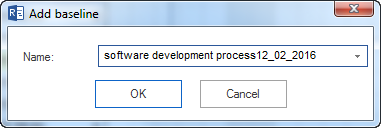
Give the baseline a clear name, for example
Approval 2026-05.Confirm with OK.
Rillsoft Project allows several baselines. Use this when the project frame changes officially (change order, scope extension).
More: Best Practices