Maintain Working Times and Non-Working Days
Goal
Ensure that resource supply is calculated realistically. Working times, calendars, holidays, shift calendars, and non-working days determine which capacity is actually available in capacity balancing.
Why This Matters
Capacity balancing is only as good as the availability data in the resource pool.
If non-working days, vacation, illness, training, or different working times are missing, Rillsoft Project may show too much available capacity. Bottlenecks may then appear only after employees have already been assigned.
Maintain Calendars
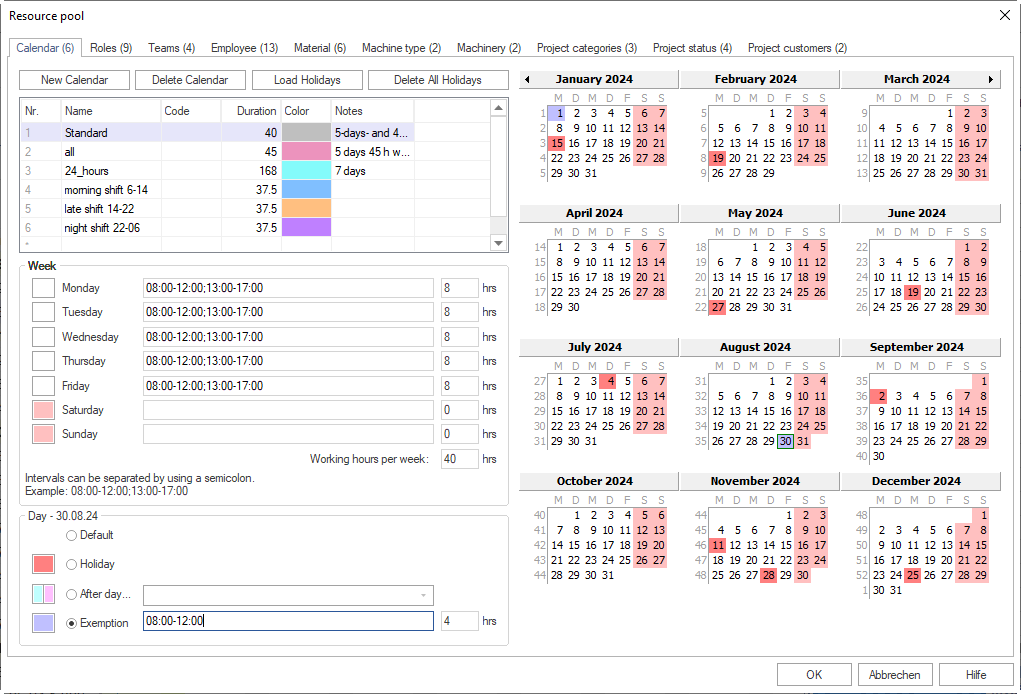
Calendars define basic working time. Open the resource pool with Start > Properties > Resources and select the Calendars tab.
Check in the calendar:
calendar name
code if data is exchanged
color for easier distinction
working time per weekday
working-time intervals, for example
08:00-12:00; 13:00-17:00holidays
different working days
exceptions for individual days
Distinguish Weekdays and Individual Days
Rillsoft Project distinguishes between working-time definitions for the week and exceptions for individual days.
Examples:
Monday to Friday use regular working times.
A holiday is non-working.
One individual day has different working times.
One day exceptionally follows the definition of another weekday.
For capacity planning, the important point is that changing the weekly definition has a different effect than an exception for a specific date.
Load Holidays
Public holidays can be downloaded from the server for additional years and different federal states and then imported into the calendar. Use Load holidays on the Calendars tab of the resource pool. You can import all offered holidays for a year or select individual holidays.
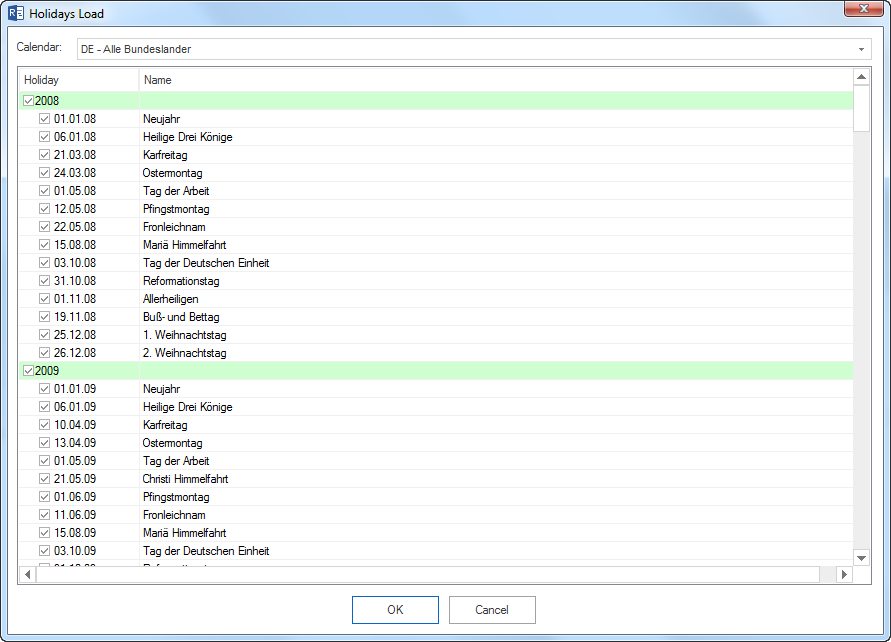
Afterwards, check:
Was the correct calendar selected?
Were all holidays imported or only selected holidays?
Are holidays available for the relevant planning period?
Were old or wrong holidays imported accidentally?
Check Employee Calendars
An employee can have a calendar assigned in the employee area. If no employee calendar is selected, Rillsoft Project uses a calendar hierarchy.
Check:
Does the employee have a personal calendar?
Does a team calendar apply?
Does a task or project calendar apply?
Is the calendar logic plausible for the planned period?
Use Shift Calendars
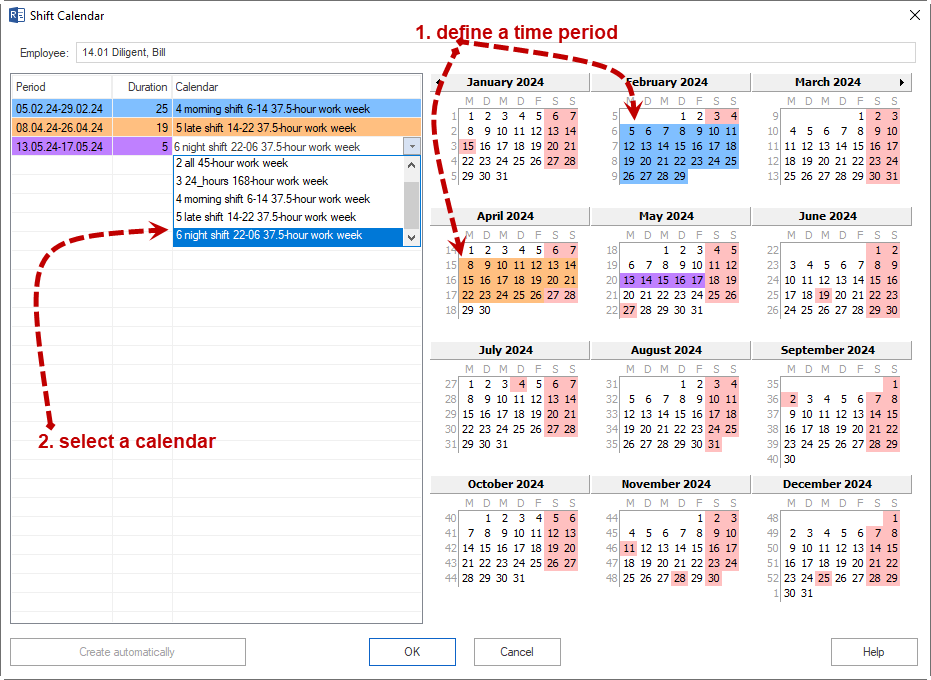
A shift calendar is useful when an employee works according to different calendars in different periods.
Typical cases:
changing shifts
temporary different working times
project phase with special working time
seasonal working-time models
The selectable calendars must already be available on the Calendars tab of the resource pool.
Enter Non-Working Days
Non-working days reduce resource supply in addition to the calendar.
Typical reasons:
vacation
illness
training
further education
business trip
internal absence
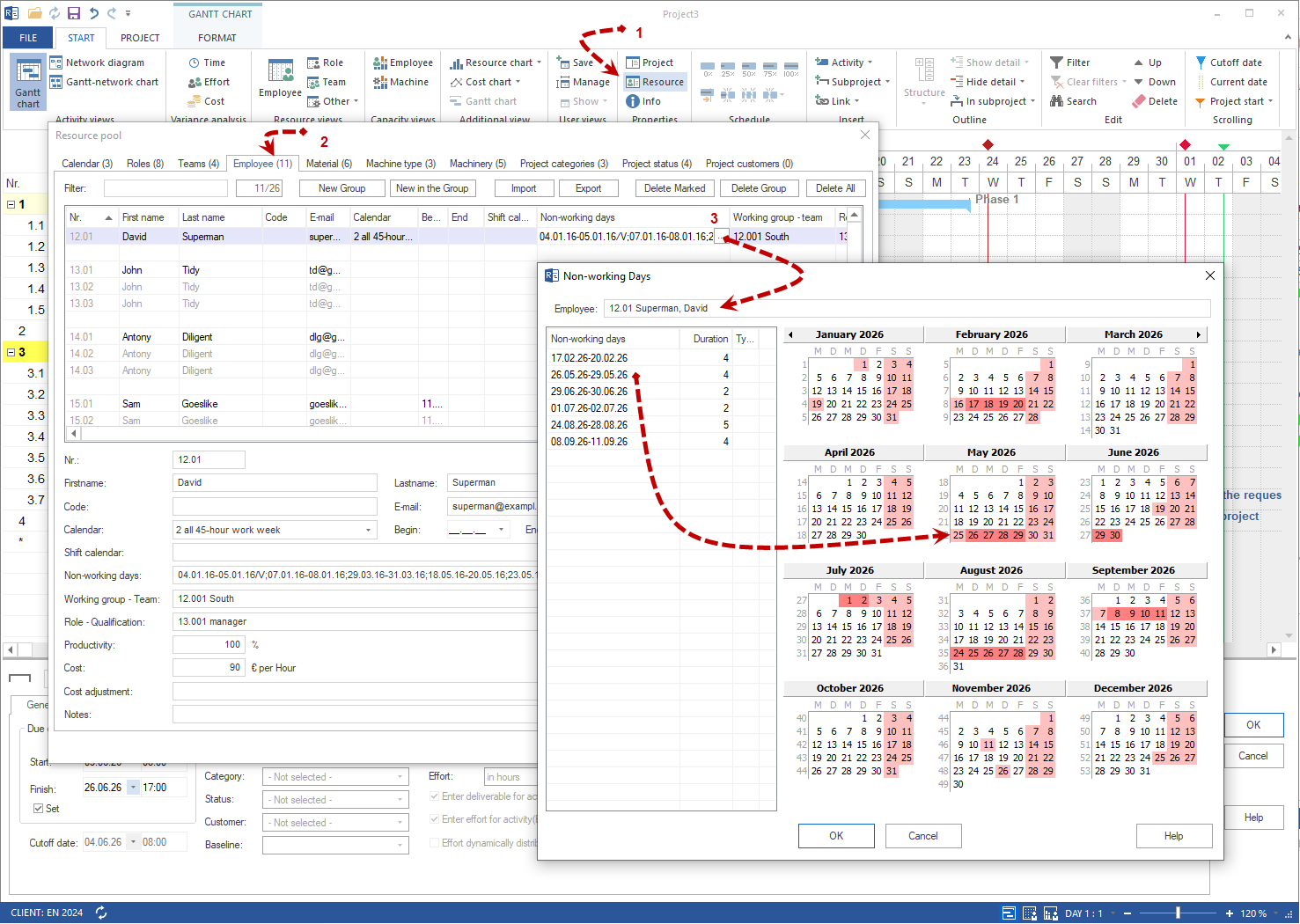
Non-working days are entered in Non-working days on the Employees tab of the resource pool (Start > Properties > Resources -> Employees). These non-working days are considered in addition to non-working days defined for the team.
Examples for periods:
18.03.2026-22.03.202625.05.202608.06.2026-17.06.2026
Impact on Capacity Balancing
Non-working days and different working times directly affect resource supply.
This means:
An employee may be professionally suitable but unavailable in the period.
A team may generally have enough employees but be undercovered in the period.
A capacity bottleneck can be caused by vacation or a shift calendar even when enough people exist in the resource pool.
A wrong calendar assignment can create the appearance of free capacity.
Pre-Balancing Checklist
Before capacity balancing, check:
Are calendars maintained for the planning period?
Are holidays loaded?
Are different working days entered?
Are employee non-working days entered?
Are team-related non-working days relevant?
Do employees have suitable shift calendars?
Are start and leaving dates plausible?
Check the Result
Availability data is maintained sufficiently when capacity balancing shows realistic working capacity in the planned period, not just theoretical employee counts.
Next Steps
Then perform capacity balancing.