Practical Examples
This article describes typical planning situations in Rillsoft Project and shows which planning approach, settings, and views are especially relevant.
Small Team: Direct Planning
Situation: A project with 5 to 15 people, clear responsibilities, and a manageable project structure. Most employees work on one project. Vacation and absence planning is handled by agreement or a simple external process.
Recommended approach:
Create the project, subprojects, and activities.
Add links and check the critical path.
Assign employees directly to activities.
Check employee workload in the personnel views.
Save a baseline and maintain progress.
For small teams, a simple resource pool with employees, calendars, and a few roles is often sufficient. Integration Server is not required unless central data, permissions, web functions, or DMS are needed.
This approach reaches its limits when employees start working on several projects, overloads appear unexpectedly, qualification planning becomes important, or absences must be included reliably in capacity balancing.
Several Parallel Projects: Manage Resource Competition
Situation: Several projects use the same employee pool. Project managers see their own projects, but central resource control is difficult. Bottlenecks appear because the same qualified people are planned in several projects.
Recommended approach:
Maintain a shared resource pool.
Plan activities first with roles or professional qualifications.
Use capacity balancing to see which project demands which qualification.
Build a project portfolio with all active projects.
Review role utilisation before employee assignments become binding.
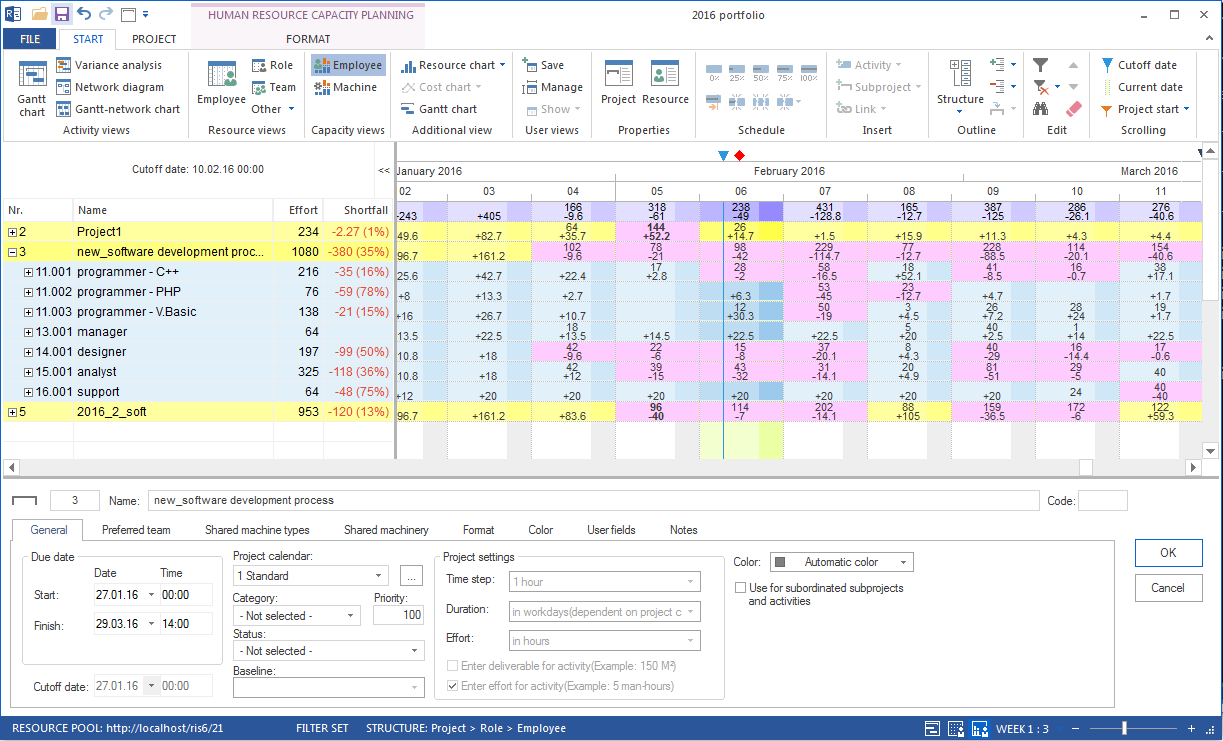
Without Integration Server, this can work for a small number of projects and planners with disciplined file handling. With more projects, more planners, or central permissions, Integration Server or Rillsoft Cloud is the stronger operating model.
Bottleneck Qualification: Control Scarce Capacity
Situation: A professional qualification is scarce, for example a specialist engineer, certified welder, test expert, or CAD specialist. Several projects need this qualification at the same time.
Goal: Make the bottleneck visible, prepare a decision, and adjust dates to real capacity.
Step 1: Make the bottleneck visible
Plan affected activities with the bottleneck role.
Open capacity balancing and identify shortfall.
Use project-specific capacity views to see which project consumes capacity.
Step 2: Clarify priority
No bottleneck can be solved without a priority decision. Clarify:
Which project has priority for this qualification?
Which projects can wait without endangering critical dates?
Are alternatives possible, such as external capacity or training?
Step 3: Adjust the plan
Move lower-priority activities, check capacity balancing again, and assign named employees according to the decision.
Step 4: Monitor continuously
Review the bottleneck qualification regularly. Changes in one project can affect the whole portfolio.
Server Or Cloud: Choose The Operating Model
Situation: The organisation grows or requirements for shared planning, central permissions, document management, or web access increase.
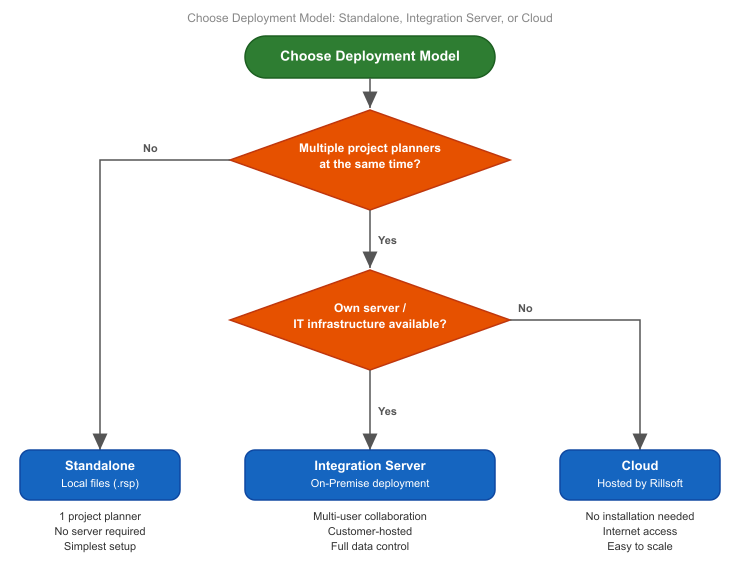
Choose standalone files when:
one project manager or a small team plans independently
no central permissions or web functions are required
quick introduction without server operation is decisive
Choose Integration Server when:
several project managers use the same resource pool
central permissions, project versions, DMS, or auditability are required
the organisation operates its own server infrastructure
web functions such as time recording or vacation planning are needed
Choose Rillsoft Cloud when:
own server infrastructure is not available or not wanted
planners and employees work from different locations
fast provisioning is more important than on-premise operation
Migration From Standalone To Server
The change from standalone files to Integration Server is possible, but it needs preparation:
Centralise and clean the resource pool.
Model directories and permissions before migrating projects.
Create users and roles.
Move projects gradually to central storage.
Keep parallel local and server operation as short as possible.