Choose an Operating Model
Rillsoft Project can be used in three operating models: as a standalone desktop application, together with Rillsoft Integration Server, or as Rillsoft Cloud. The operating model determines where data is stored, how users collaborate, and which server-based functions are available.
Operating Models at a Glance
Criterion |
Standalone |
Integration Server |
Cloud |
|---|---|---|---|
Project planners |
One person |
Several users |
Several users |
Data storage |
Local project files or network drive |
Central database on your server |
Central database hosted by Rillsoft |
Rights and user management |
Not available |
Users, roles, and folders |
Users, roles, and folders |
Portfolio and multiproject planning |
Limited to local files |
Full support, including cross-project links |
Full support |
Time entry and vacation planning |
Not available |
Available |
Available |
IT effort |
Desktop installation only |
Server installation and maintenance |
No own server required |
Best suited for |
Individual planners and simple projects |
Companies with several planners and their own IT operation |
Companies that want server functions without operating a server |
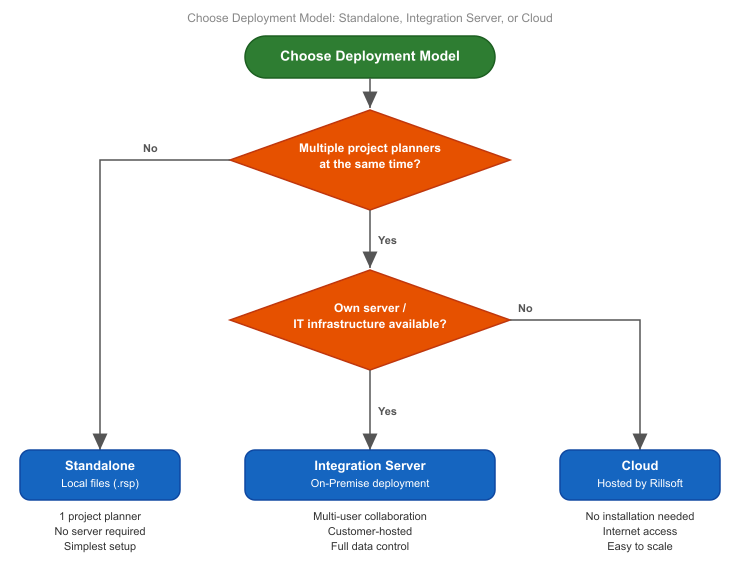
Standalone: Local File-Based Planning
In standalone operation, Rillsoft Project works locally. Projects are saved as local project files. The resource pool can be kept as a separate file.
Use standalone operation when:
one person plans the projects,
central rights or approval workflows are not required,
shared resource management across several project managers is not required.
Limits:
several project managers cannot work at the same time with the same central resource data,
portfolio analysis is based on manually combined files,
time entry and vacation planning through the web interface are not available.
Integration Server: Central Operation
Rillsoft Integration Server is the platform for companies that coordinate several project planners, manage shared resources, and store projects centrally.
Use Integration Server when:
several project managers work with the same projects, resources, or portfolios,
access rights for projects, portfolios, or documents must be managed,
time entry, vacation planning, DMS, iCalendar, LDAP, or email notifications are required,
several organizational units need separate administration.
Prerequisites:
a server environment operated by your company with a central database,
installation and maintenance covered by a software service contract,
a separate license for Rillsoft Integration Server and the server connection of Rillsoft Project,
administrator setup: clients, users, roles, and folders,
Rillsoft Project Desktop as the client on all workstations.
Typical setup:
An administrator creates clients, folders, users, roles, and access rights.
The project manager connects Rillsoft Project Desktop to the server.
Projects and the resource pool are stored on the server.
Users access data according to their role.
How several project managers work at the same time: Planning as a Team: Multi-User Work and Summary Projects.
Cloud: Hosted Operation
Rillsoft Cloud provides the server-based operating model without an own server. It is useful when you want central data and collaboration, but do not want to operate the Integration Server infrastructure yourself.
Use cloud operation when:
server functions are required,
a fast start without server installation is important,
hosted data storage is acceptable for your organization.
Prerequisites:
a Rillsoft Cloud subscription,
Rillsoft Project Desktop as the client,
an internet connection for synchronization.
Multi-user work and summary projects are available in Rillsoft Cloud just as with Integration Server, see Planning as a Team: Multi-User Work and Summary Projects.
Before choosing cloud operation, clarify data protection, user access, and licensing with your Rillsoft contact.
Changing the Operating Model
Moving from standalone operation to Integration Server or Cloud is possible, but it is not just a technical switch:
Projects and the resource pool must be transferred to the central system.
User accounts, roles, and folders must be set up.
Existing planning data must be checked after migration.
Users need login data and a defined workflow for saving and opening projects.
Related Topics
operating model, standalone, integration server, cloud, central database, multi-user, ris, time entry, vacation planning, it and administration, executive management, project manager