Update the Resource Pool
In a multi-user environment, the shared resource pool can be changed by a responsible person while you are already working with it. To adopt those changes, reload the resource pool.
When Reloading Is Useful
Reload the resource pool when:
a responsible person has changed employees, roles, calendars, or other master data in the resource pool
several planners use the same resource pool
you want to make sure that you plan with the current resource supply
Reload the Resource Pool
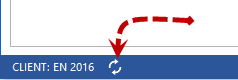
Click the Update resource pool icon in the left corner of the status bar. The current resource pool is reloaded, and the changes are adopted.
Distinction
Update resource pool reloads the unchanged, current resource pool to adopt changes made by other users in the meantime.
Synchronize resources resolves differences between the resources stored in the project and the resource pool. See Synchronize Resources.
Reload project/portfolio reloads the project data, not the resource pool. See Reload a Project.