Setting Up and Operating Integration Server
This article describes the operational setup and day-to-day operation of Rillsoft Integration Server. It is intended for administrators and IT owners who configure the server initially or set up new clients, users, and modules.
Conceptual introduction: Integration Server
Set Up Clients
A client is the organisational base unit in Integration Server. Each client has its own resource pool, its own directory structure, and its own user assignments.
Basic rule: One resource pool belongs to one client. If several independent resource pools are required, for example for different sites, companies, or business units with separate personnel planning, several clients must be created accordingly.
Create a client:
Open: Administration > Clients > New client
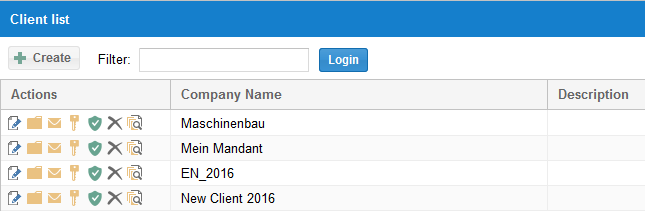
Fields:
client name
description / notes
After creation, directories, user access, and email templates can be configured for the client.
Client sharing:
Every user needs explicit access for each client they are allowed to work with. Without client sharing, the user does not see the client and can open neither its resource pools nor its projects.
Manage client sharing on the matrix page Administration > Client sharing (users as rows, clients as columns), where a user is enabled for a client with an icon button. Alternatively, manage it per user under Administration > Users > [user] > Client sharing.
Note: Client sharing alone is not sufficient for access to the resource pool, projects, or portfolios. The user also needs the matching user roles and directory roles.
Resource pool versions:
Integration Server stores versions of the resource pool. Earlier resource pool versions can be displayed and restored in the client dialog. This helps with unintended changes.
Select the resource pool in Rillsoft Project:
The resource pool of a client is selected in Rillsoft Project via File > Resource pool > Rillsoft Integration Server > Select, see Create and Select a Resource Pool with Rillsoft Integration Server.
Directories and Project Structure
Directories model the portfolio structure of a client. They are virtual structures that can be organised by professional criteria: department, project type, site, phase, or customer group.
Open: Administration > Directories or through the client dialog.
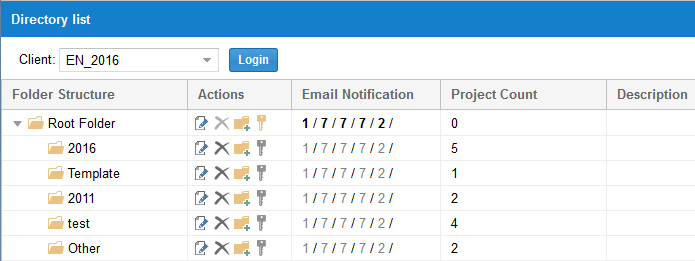
Create a directory:
Click New subdirectory in the required parent directory.
Enter name and description.
Assign access rights (directory roles).
Directories can be dragged to the required position.
Inherited access rights:
Access rights of a parent directory automatically apply to all subdirectories unless different rights have been set. A gray key in the directory dialog indicates inherited rights; a yellow key indicates directly assigned rights.
Recommendations for the directory structure:
Follow the actual project landscape, not the organisation chart hierarchy.
Create at most three to four directory levels to keep the structure manageable.
Check regularly whether the directory structure still matches the project landscape.
Create and Manage Users
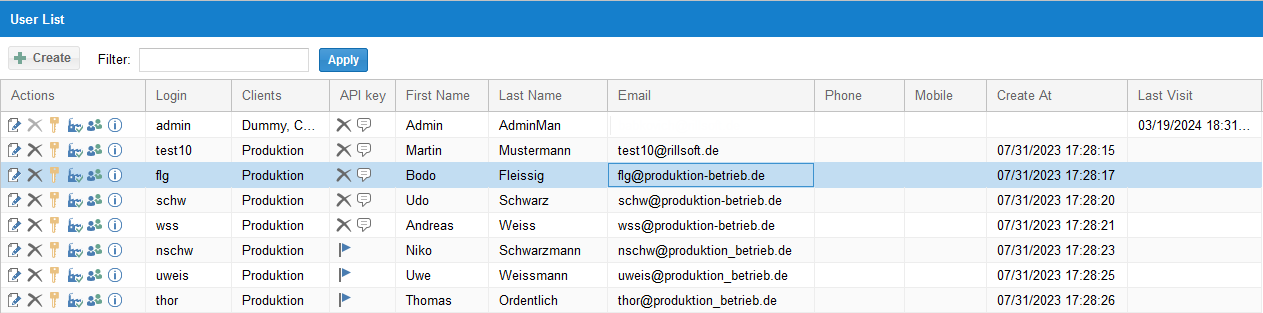
Users are people who are allowed to work with Rillsoft Project through Integration Server. They can be set up across clients.
Open: Administration > Users
Create a user:
Click New user.
Enter name, user name, and password.
Assign user roles to the user.
Grant client sharing for all relevant clients.
Assign the matching employee resources to the user for feedback entries.
Connect user and employee resource:
A user in Integration Server and an employee resource in the resource pool are two different objects. So that a user may enter feedback (time entries) for specific employees, the user must be assigned to those employees in the resource pool.
API access keys:
For every integration (iCalendar, Timeline, REST API), a user needs an API access key. Keys can be generated, displayed, and deleted under Administration > Users. A user can also receive the key by email.
Permission Model: User Roles and Directory Roles
Integration Server separates two kinds of roles:
User roles control directory-independent rights: user management, portfolio, resource pool, and add-on modules. They apply across clients.
Directory roles control directory-dependent rights: work with projects in a specific directory, time entry, and email notifications.
The seven predefined user roles:
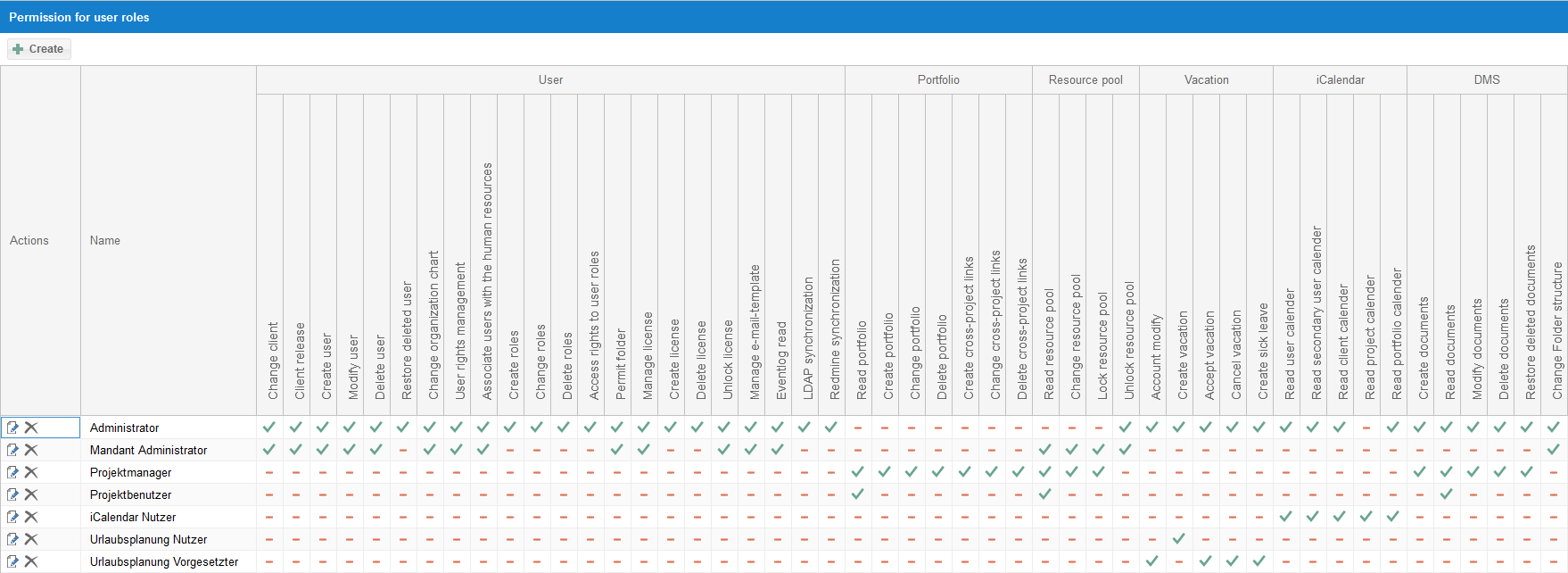
User role |
Most important rights |
|---|---|
Administrator |
Full access to user management, all clients, and all functions. For the technical server administrator. |
Client Administrator |
User management and configuration within one client. For IT-side client maintenance. |
Project Manager |
Create, change, and delete portfolios; create cross-project links; read and change the resource pool. For senior project planners. |
Project User |
Read portfolios; read the resource pool. Minimal role for project work in Rillsoft Project with a server connection. |
iCalendar User |
Read iCalendar feeds. For users who synchronise project dates with Outlook, Google Calendar, or similar applications. |
Vacation Planning User |
Submit vacation requests and view their own vacation account. |
Vacation Planning Supervisor |
Approve vacation requests and view vacation plans of subordinate employees. |
Directory roles (typical variants):
Root directory user: read projects in the directory and enter feedback.
Root directory administrator: read and write projects, accept feedback, and manage date changes and locks.
Custom user roles can be created under Administration > User roles when the predefined roles are not sufficient.
Minimum rights for Rillsoft Project users:
So that a user can access Integration Server from Rillsoft Project, the user needs at least:
user role Project User (right: read resource pool)
a directory role for the relevant directory
Without this minimum combination, the user cannot open a resource pool or any projects.
Organisation Chart
The organisation chart in Integration Server models the hierarchical structure of users. It does not model the project organisation, but the approval structure for feedback and vacation planning.
Open: Administration > Organisation chart
The organisation chart is used for three areas:
Feedback: who may accept feedback for whom?
Vacation planning: who approves vacation requests for whom?
Administration: hierarchical user view for reports and the Timeline.
Users can be placed in the hierarchy by drag and drop.
Important: The organisation chart applies independently of directory rights. A user can have approval rights in the organisation chart without having administrator rights on project directories.
Feedback (Web-Based Time Entry)
The feedback module lets project members enter their working hours directly in the browser. This removes the manual entry in Rillsoft Project by the project manager.
Open: Feedback > Calendar
Display in the feedback calendar:
blue: planned working times (from the project plan)
yellow: reported feedback that has not been accepted yet
green: accepted feedback
Enter completed hours (three ways):
Directly in the calendar view: click the cell of the required day and enter the hours.
Using a predefined percentage: choose a percentage (25%, 50%, 75%, 100%) in the action column.
Using the input form: click the pencil icon button for a detailed entry with notes, different times, and remaining effort.
Approval workflow:
The employee enters completed hours (status: reported).
The responsible user (according to the organisation chart) checks the report.
The responsible user accepts or rejects it.
Accepted hours are transferred to Rillsoft Project as actual effort.
Access rights for feedback:
enter feedback: user role Project User + directory role root directory user
accept feedback: directory role root directory administrator + user role Project User or Project Manager
Vacation Planning
The vacation planning module manages vacation requests, absences, and vacation accounts in the browser. It automatically checks overlaps with planned project work.
Submit a vacation request:
Open: Vacation planning > Requests > New request
Select the employee, enter start and end, and add vacation type and comment.
If the request overlaps planned activities, a warning icon appears in the action column.
Vacation types: recreational leave, illness, special leave, and other configurable absence types.
Accounts:
Every employee has a vacation account with annual leave and carry-over from the previous year. Accounts can be edited under Vacation planning > Accounts.
Group calendars:
Group calendars let employees view their colleagues’ vacation plans. An employee can belong to several groups at the same time.
Approval:
Users with the role Vacation Planning Supervisor can approve, reject, or cancel vacation requests for employees subordinate to them in the organisation chart.
Access rights:
submit vacation requests: user role Vacation Planning User
approve vacation requests: user role Vacation Planning Supervisor
Synchronisation with the resource pool:
Approved absences can be transferred to the Rillsoft Project resource pool. There they appear as non-working days and are considered in capacity balancing.
Timeline
The Timeline shows tasks of all projects of a client or portfolio in a browser timeline view.
Open: Timeline in the Integration Server main menu.
Five Timeline types:
Timeline type |
Content |
|---|---|
User timeline |
All tasks of the currently logged-in user, across projects per client. |
Timeline of subordinate users |
Tasks of all users subordinate to the user according to the organisation chart. |
Client timeline |
All tasks of the client from all projects. |
Portfolio timeline |
All tasks of a specific project portfolio. |
Project timeline |
All tasks of a single project. |
The Timeline always shows the current planning state. It is a read function; changes to the plan are made in Rillsoft Project.
The browser timeline opens through the Timeline button in the action column.
iCalendar Integration
The iCalendar module provides project dates as a standard calendar feed
(.ics). Project dates can thus be transferred to external calendar
applications: Microsoft Outlook, Google Calendar, Apple iCal, Mozilla
Thunderbird, and other ics-capable applications.
Five calendar types (analogous to the Timeline):
user calendar, calendar of subordinate users, client calendar, portfolio calendar, and project calendar.
Prerequisites:
The user has the user role iCalendar User.
An API access key must be generated for every iCalendar user (under Administration > Users).
Configure iCalendar content:
In the client dialog under the client properties, you can define which project information is transferred into the calendar entries (project name, employees, notes, and so on).
Important: iCalendar always delivers the current planning state. The calendar feed is read-only; plan changes must be made in Rillsoft Project.
LDAP Connection
LDAP enables importing users from existing directory services such as Microsoft Active Directory. Existing user names and passwords can be managed centrally in Active Directory.
Open: the LDAP button in the administration area.
Workflow:
Open the LDAP login dialog and connect to the LDAP server.
The list of LDAP users is displayed.
Transfer the required users to Rillsoft by clicking the person-plus icon.
Transferred users can log in to Rillsoft with their existing Active Directory password.
Two LDAP functions:
User import: transfer Active Directory users to Rillsoft once or regularly.
User login through AD: transferred users authenticate through the LDAP server instead of a separate Rillsoft password.
Note: After the import, user roles and client sharing must still be configured manually. LDAP imports only the user master data, not the permission structure.
Email Notifications
Integration Server can automatically send emails to employees and users when specific events occur.
Configuration: Administration > Directories; in the Action column, click the sheet-with-pencil button and open the Email notification tab; define the periods per task type there.
Six notification types:
Notification type |
Effect |
|---|---|
Reminder of unfinished tasks (X days back) |
Email to assigned employees when the task start lies in the period and progress is 0%, or the task finish lies in the period and progress is below 100%. |
Reminder of upcoming tasks (X days ahead) |
Email to employees with tasks starting in X days. |
Notification about date changes (employees) |
Email to employees when dates of their tasks were changed within X days. |
Notification about date changes (users) |
Email to users when dates of tasks of their subordinate employees were changed. |
Notification about milestone date changes |
Email to users when milestone dates were moved. |
Notification about negative effort |
Email to users when assigned employees have non-working days and no substitute resource is assigned on those days. Relevant and available only with due-date-oriented planning. |
Important: With the first email dispatch, all tasks in the defined period are listed. Afterwards, only new events are reported; tasks that were already reported do not appear again.
Email templates for clients can be adapted under Administration > Clients > [client] > Email templates.
Migrate Projects Gradually
Do not move all local project files to the server in one step. A controlled migration usually works better:
Clean up the resource pool and roles.
Create clients, directories, and permissions.
Migrate a small pilot set of projects.
Check opening, saving, locking, versions, and portfolio views.
Validate capacity balancing and project controlling.
Migrate further projects in batches.
Keep the parallel phase short. If the same project exists both as a local file and as a server project, users can easily work on the wrong version.
Setup Checklist
For a complete Integration Server setup:
✓ |
Step |
|---|---|
Create and name clients. |
|
Create the directory structure and configure access rights. |
|
Check and adapt user roles (the predefined roles are usually sufficient). |
|
Create users, assign user roles, and grant client sharing. |
|
Build the organisation chart for feedback and vacation planning. |
|
Assign employee resources to users for feedback. |
|
Configure and test the feedback module (enter and accept a test feedback). |
|
Set up vacation planning (annual leave, vacation types, group calendars). |
|
Activate iCalendar: assign the user role and generate API keys. |
|
Email notifications: configure periods per directory and test them. |
|
Connect LDAP if Active Directory is used. |
|
Test the project connection from Rillsoft Project to the server. |