Import
Rillsoft Project takes over project data from other sources through File > Import. Supported formats are MS Project XML, text files in CSV format, XML for web, and GAEB.
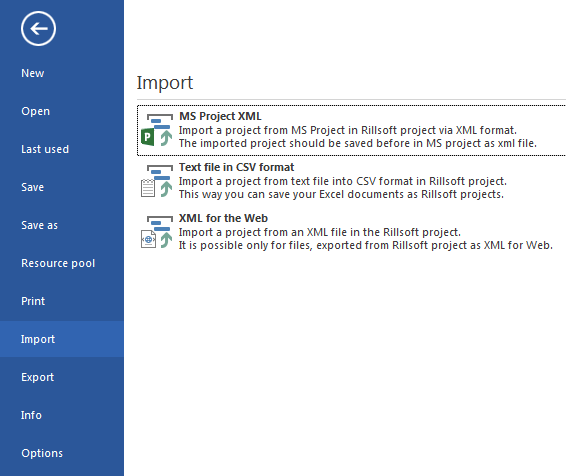
Supported Formats
Format |
Use |
|---|---|
MS Project XML |
Import of projects that were saved in MS Project in XML format. Resources are assigned to the resource types in Rillsoft Project during import. |
Text file in CSV format |
Import of simple planning data: project structure, names, start and finish dates, user-defined fields (up to 20). |
XML for web |
Import of XML files previously created via File > Export > XML. |
GAEB |
Import of tender data in GAEB 90, GAEB 2000, and GAEB DA XML format. Typical for construction and tendering contexts. |
Import MS Project XML
Prerequisite: the MS Project project is available as an XML file (in MS Project: File > Save as, file type XML format (*.xml)).
Steps:
In Rillsoft Project, click File > Import > MS Project XML.
Select the XML file and click Open.
The Manual Allocation of Resources dialog shows the resources from the XML file. Assign each resource to a resource type.

Resource types in the assignment dialog:
Resource type |
Meaning in Rillsoft Project |
|---|---|
Roles |
Professional qualifications entered as demand on the activity. |
Teams |
Groups of employees with shared capacity. |
Employees |
Concrete persons with their own calendar and availability. |
Machine types |
Types of equipment or machines. |
Machinery |
Individual machines or devices assigned to a machine type. |
Assign all resources at once: click Mark All as: Roles (or another resource type) if all imported resources are to receive the same type.
Click OK.
Result: the project is open in Rillsoft Project. Check the project structure, resource assignments, and calendars after the import.
Import A Text File In CSV Format
The CSV format supports two variants for the project structure:
Variant |
Structure |
|---|---|
Variant 1 - WBS code |
Each row contains one activity. The hierarchy is determined from a WBS
code column (for example |
Variant 2 - column grouping |
Several activities per row. The hierarchy is created by several text columns (for example branch → service group → subgroup → activity). |
Example variant 1 (WBS code):
WBS;Name;Start;Finish
1;Subproject A;25.08.2024 08:00;05.09.2024 17:00
1.1;Activity 1;25.08.2024 08:00;29.08.2024 17:00
1.2;Activity 2;28.08.2024 08:00;03.09.2024 17:00
Step 1 - import dialog:
Click File > Import > Text file in CSV format.
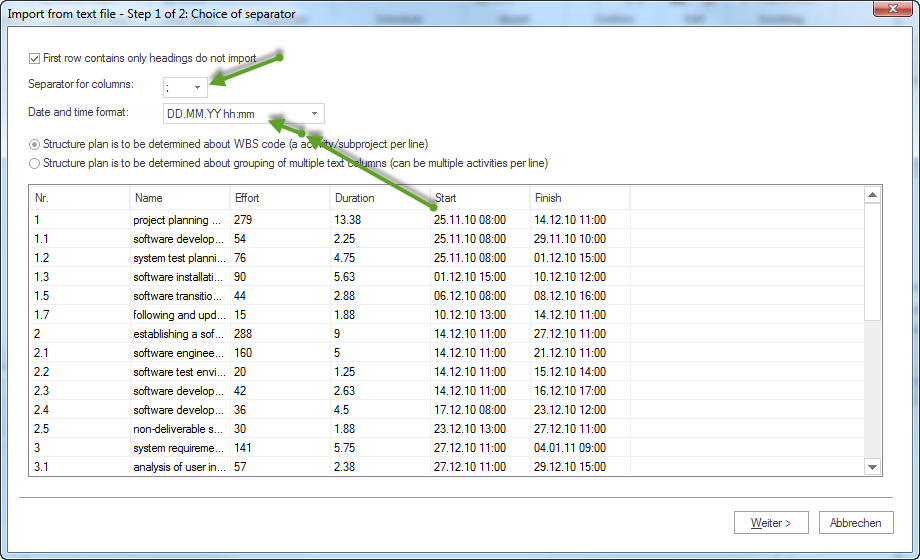
Field / option |
Meaning |
|---|---|
First row contains only headings, do not import |
Enable when the first row contains the column labels and should not be imported as an activity. |
Separator for columns |
Column separator in the CSV file (for example semicolon, comma, tab). |
Date and time format |
Format for date and time entries in the file (for example
|
Structure plan variant |
Select variant 1 (WBS code) or variant 2 (column grouping). |
Click Next.
Step 2 - column mapping:
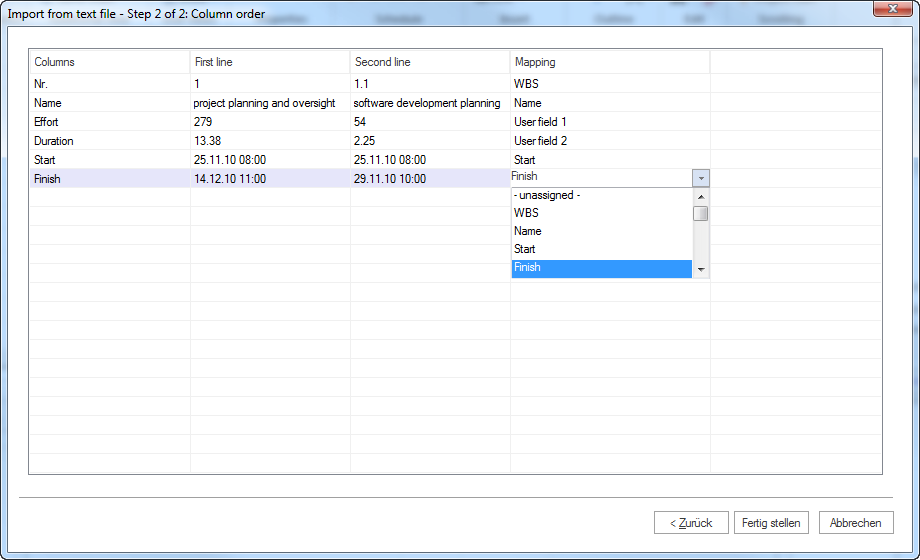
In the Assignment column, assign a project property to each data column (for example column
Name→ property Activity name, columnStart→ Start date).Click Finish.
Importable fields:
project structure (subprojects, activities)
names of the subprojects and activities
start and finish dates
user-defined fields (up to 20)
Import XML For Web
File > Import > XML for web reads files created via File > Export > XML. This path is used for exchange between Rillsoft Project installations or for archiving and restoring projects.
Steps:
Click File > Import > XML for web.
Select the XML file.
Click Open.
Import GAEB
File > Import > GAEB reads tenders in the formats GAEB 90, GAEB 2000, and GAEB DA XML. The imported items appear as activities in the Gantt chart.
Steps:
Click File > Import > GAEB.
Select the GAEB file.
Click Open.
Check After Import
Check the following points after every import:
Check point |
What to check? |
|---|---|
Project structure |
Subprojects and activities in the correct hierarchy? |
Dates and durations |
Start and finish dates taken over correctly? |
Resource types |
Roles, teams, employees, machines assigned correctly? |
Calendars |
Working time and non-working days plausible? |
Links |
Dependencies between activities correct? |
Capacity effect |
Resource assignments have the correct effect on the utilisation? |