Project Planning
This section explains how to turn a project idea into a reliable schedule. The focus is on project structure, tasks, subprojects, dependencies, the critical path, free float, and schedule checks.
Resource assignment does not belong to project planning. It is covered in resource and capacity planning and in resource assignment.
Goal of Project Planning
At the end of project planning, the schedule should be understandable, logically linked, and easy to check.
A good schedule answers these questions:
Which work units must be completed?
Which tasks belong together?
Which tasks depend on each other?
Which tasks determine the finish date?
Where is free float available?
Is the planned finish date realistic?
Build the Project Structure
Start with the professional structure of the project. Do not enter every detail immediately; clarify the structure first.
Typical structure:
Project
Subproject
Task
Milestone
Dependency
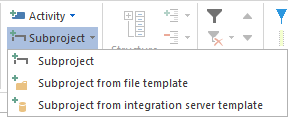
Use subprojects when several tasks belong together, for example by phase, role group, department, deliverable, or location.
Plan Tasks
Tasks are the schedulable work units in the project. They contain duration, dates, effort, dependencies, and later also resource demand.
You can create tasks in several ways:
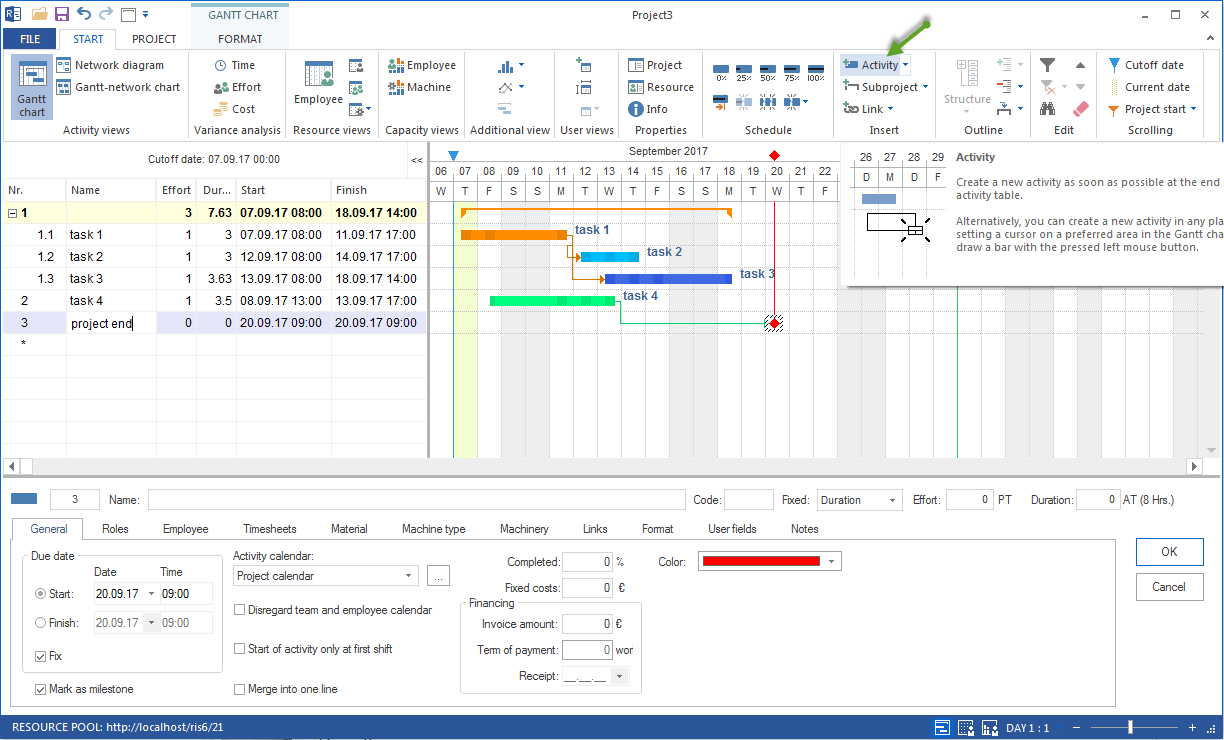
with Start > Activity
by drawing a bar in the Gantt chart
from the context menu in the chart area
Recommended workflow:
Enter the most important tasks first.
Use task names that are clear and result-oriented.
Define start, finish, or duration only as precisely as the planning situation requires.
Structure larger sections with subprojects.
Use milestones for important decision points or delivery dates.
Good task names describe concrete work or a concrete result, for example:
Approve design
Order material
Prepare assembly
Perform acceptance
Use Subprojects
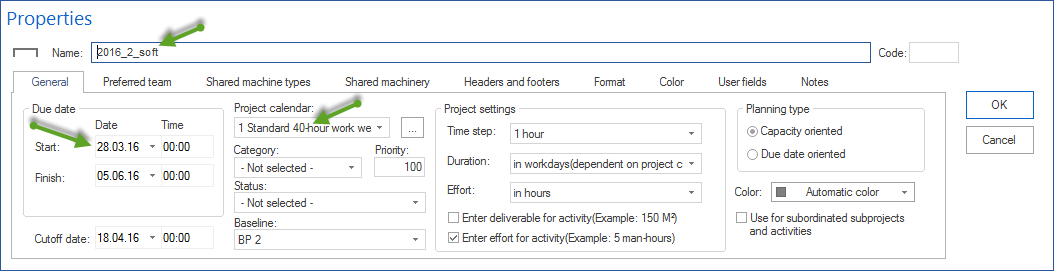
Subprojects help keep large schedules understandable. You can create an empty subproject or combine selected tasks into a new subproject.
Use subprojects when:
a project contains many tasks
several tasks belong together professionally
a project should be structured by phases, areas, or locations
individual sections should be planned, checked, or optimized separately
Typical workflow:
Enter the tasks at the top level.
Select the tasks that belong together.
Create a subproject from them.
Give the subproject a clear name.
Check whether the subproject start and finish match the included tasks.
Set Milestones
Milestones mark important dates without their own duration. They are suitable for approvals, delivery dates, checks, acceptances, or phase transitions.
Use milestones sparingly and deliberately. Too many milestones make the plan hard to read; too few make control more difficult.
Link Tasks
Dependencies describe logical relationships between tasks. Without dependencies, tasks only stand next to each other. With dependencies, they form a calculable schedule.
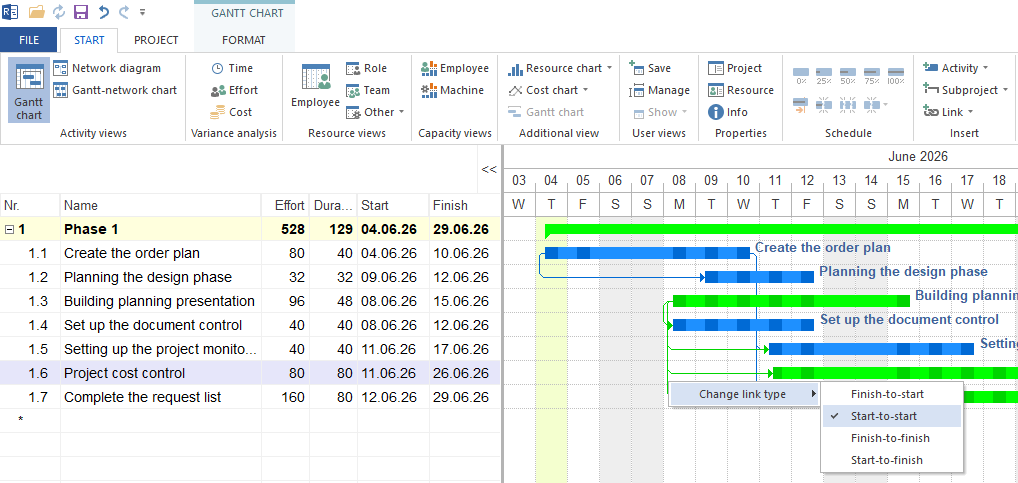
Rillsoft Project supports these dependency types:
Dependency type |
Meaning |
|---|---|
Finish-Start |
The successor can start only after the predecessor has finished. |
Start-Start |
The successor cannot start earlier than the predecessor. |
Finish-Finish |
The successor cannot finish before the predecessor has finished. |
Start-Finish |
The successor cannot finish before the predecessor has started. |
Incompatible activity group |
Tasks must not be executed at the same time. |
For most schedules, Finish-Start is the standard dependency type.
Create Dependencies
Typical workflow:
Choose the suitable dependency type.
Connect predecessor and successor in the Gantt chart, network chart, or Gantt-network chart.
Check the created dependency.
Enter a time interval or delay if needed.
Check the calculated schedule.
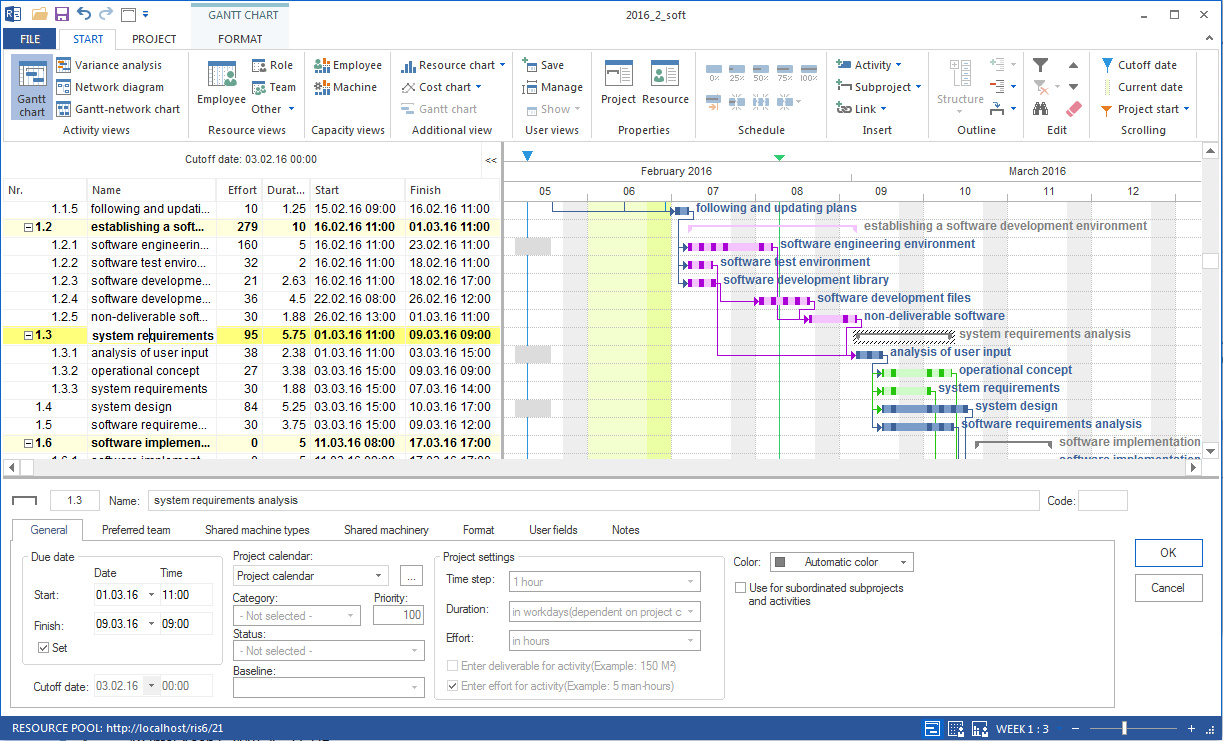
Time intervals can be positive or negative:
positive interval: waiting time between predecessor and successor
negative interval: overlap between predecessor and successor
Intervals can be absolute, calendar-based, or relative to the predecessor. Use intervals deliberately so the schedule remains understandable.
Check and Change Dependencies
Check dependencies whenever dates move unexpectedly.
Typical check questions:
Is the selected dependency type professionally correct?
Are there unnecessary dependencies?
Are there missing dependencies?
Is a delay or overlap understandable?
Has a task already started and therefore should no longer be changed freely?
Existing dependencies can be changed by using the dependency line or the properties window. A change is useful only when it describes the professional workflow more accurately, not when it merely makes a date look convenient.
Analyze the Critical Path
The critical path shows the tasks that determine the finish date. If a task on the critical path moves, the project finish date usually moves as well.
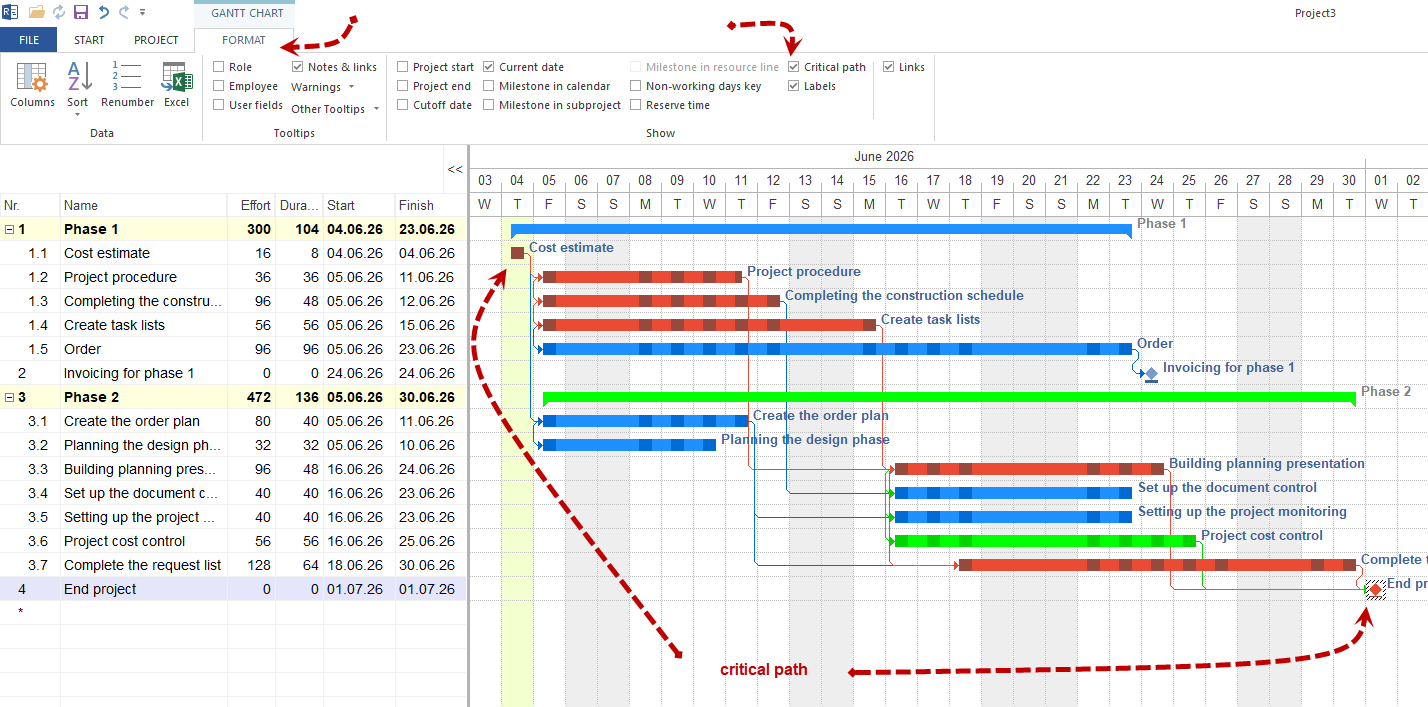
Use the critical path to decide:
which tasks need close monitoring
where schedule risks arise
which delays endanger the finish date
which tasks must not be delayed further
The critical path is not a separate planning method. It is a result of the schedule logic and is meaningful only when tasks, durations, and dependencies are maintained plausibly.
Evaluate Free Float
Free float shows how far a task can move before it reaches the next fixed date in the schedule; the calculation runs no earlier than the cutoff date. On subproject rows, the line shows the envelope of the contained tasks, not a buffer of its own.
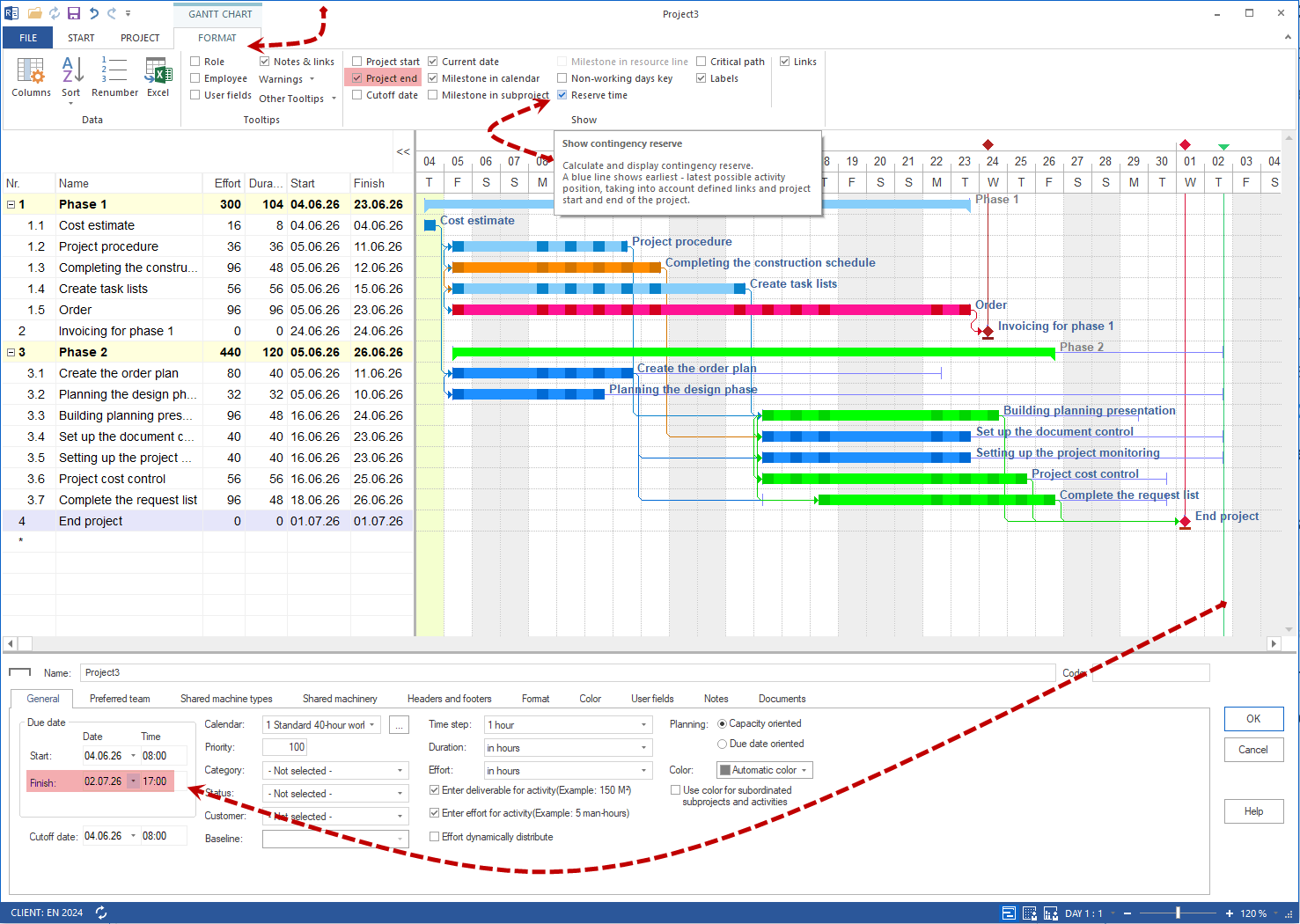
Free float is useful for these questions:
Which tasks still have room to move?
Which tasks are time-critical?
Which changes are possible without endangering the finish date?
Where can a move help reduce resource overload?
Check and Stabilize the Schedule
A schedule is reliable only after it has been checked.
Check at least:
Are all important tasks included?
Are subprojects separated sensibly?
Are there tasks without necessary dependencies?
Are there implausible durations?
Are there unnecessary or incorrect dependencies?
Is the critical path understandable?
Is there realistic free float?
Does the calculated finish date match the project target?
If the calculated finish date does not match the target date, do not blindly change individual dates. Check these items first:
Dependencies
Durations
Subproject boundaries
Free float
Resource demand and capacities
Reload a Project
In a multi-user environment, the currently open project version can become outdated. Changes made by other project managers or editors become visible only after the project is reloaded.
Important after reloading:
Check the schedule again.
Check resource utilization.
Check the critical paths.
Check the subprojects.
Check the dependencies.
Optimize a Project
Project optimization aims to reach a specified finish date and keep resource utilization as even as possible.
Important for project planning:
Fixed tasks should not be moved by optimization runs.
Fixed dates of subprojects are taken into account.
Individual subprojects can be optimized separately.
For personnel resources, the assignment hierarchy is employees, teams, roles.
Use optimization only when the basic plan is professionally clean. A poorly structured plan does not automatically become better through optimization.
Common Planning Mistakes
Avoid these mistakes in particular:
tasks without a clear professional meaning
tasks that are too large to control
missing dependencies
too many manually fixed dates
dependencies that exist only to move dates cosmetically
subprojects without a clear professional boundary
resource decisions before the schedule logic is reliable
Result of Project Planning
After completing this section, your project should:
have a clear structure
contain realistic tasks
use professionally meaningful subprojects
be logically linked
show an understandable critical path
make free float visible
be ready for resource planning and capacity control
Next Steps
When the schedule is professionally stable, plan resource demand by qualifications and then check the available resource supply.
project planning, project structure, tasks, dependencies, critical path, schedule stability, schedule, gantt, bar chart, timeline, dependency, project manager, pmo