Structure resource views
Rillsoft Project provides one-dimensional and multi-dimensional ways to structure resource views. With up to three dimensions (3D), resources can be grouped and analyzed by several criteria simultaneously. This gives you a deeper, more flexible view of employees, roles, and projects across the project or portfolio.
Resource views and capacity views
To structure a resource view, click Start > Outline > Structure.

After selection, the view is automatically adjusted to the chosen structure.
These views allow you to organize resource utilization by a single criterion, for example:
Employees
Roles
Teams
Projects
This presentation is clear, but often not enough for complex portfolios.
With the newer structure logic, resources can be grouped by multiple attributes at the same time. The levels are built hierarchically.
2D - Two-dimensional structure
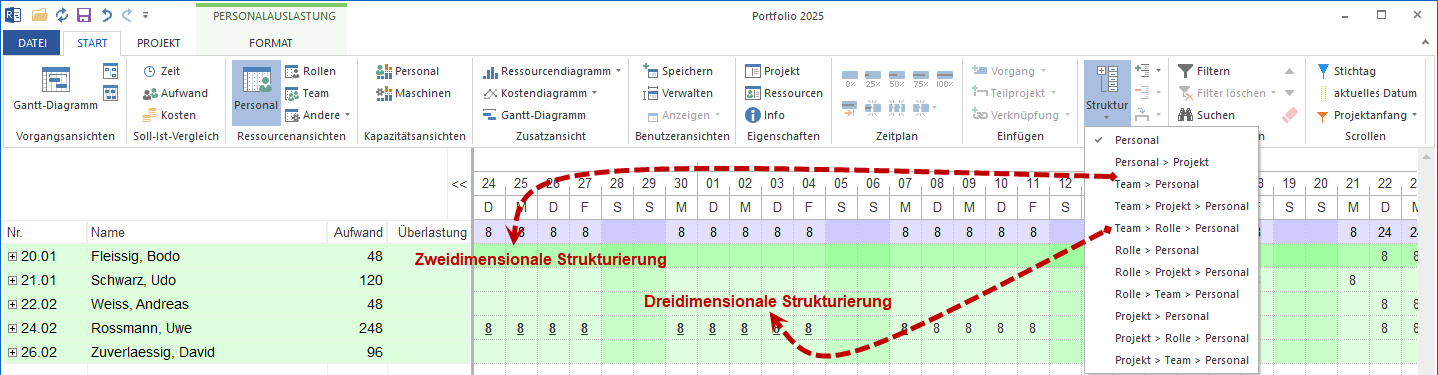
Examples:
Employee -> Project
Team -> Employee
Role -> Employee
Project -> Employee
3D - Three-dimensional structure

Examples:
Project -> Role -> Employee
Team -> Project -> Employee
Role -> Team -> Employee
These views help analyze usage areas, role distribution, and capacity allocation in more detail.
This shows:
which roles are needed in the project,
which people are assigned to those roles,
how their workload is distributed over time.